Amnesiac (ttyu0)
login: root
rts_filter_prep_fields error getting rt_flags in rtentry_t
Amnesiac (ttyu0)
login: root
Amnesiac (ttyu0)
login:
Amnesiac (ttyu0)
login: root
Amnesiac (ttyu0)
Huh no prompt for a password there just login: over and over.
Boot into single user mode.
FreeBSD/PowerPC U-Boot bootstrap loader, Revision 2.4
(dc-builder@svl-cdbu-pool007.juniper.net, Wed Jun 19 20:28:02 PDT 2013)
Memory: 2048MB
bootsequencing is enabled
bootsuccess is set
new boot device = disk0
Loading /boot/defaults/loader.conf
/kernel data=0xb5cbe6+0xd582a syms=[0x4+0x9d690+0x4+0xe62e2]
Hit [Enter] to boot immediately, or space bar for command prompt.
Type ‘?’ for a list of commands, ‘help’ for more detailed help.
loader> boot -s
Trying to mount root from ufs:/dev/da0s1a
Attaching /packages/junos via /dev/mdctl…
Mounted junos-ex package on /dev/md0…
System watchdog timer disabled
Enter full pathname of shell or ‘recovery’ for root password recovery or RETURN for /bin/sh:
Just hit enter and don’t go into recovery. Prompt changes to #.
NOTE: to go to multi-user operation, exit the single-user shell (with ^D)
# mount -a
WARNING: /config was not properly dismounted
WARNING: /var was not properly dismounted
/var: mount pending error: blocks 4 files 1
# chflags 0 /var/etc/pam.conf
# exit
chflags 0 /var/etc/pam.conf and exit to reboot. This fixed the problem where I just kept seeing login: over and over with no password prompt.
Amnesiac (ttyu0)
login: root
— JUNOS 14.1X53-D12.9 built 2015-06-25 03:06:46 UTC
rts_filter_prep_fields error getting rt_flags in rtentry_t
root@:RE:0% al daemons:set cores for group access
root@:RE:0%
Logs in correctly now and I ran the JunOS upgrade from here and got everything stable again.
Annoying messages.
Auto Image Upgrade: To stop, on CLI apply
“delete chassis auto-image-upgrade” and commit
Auto Image Upgrade: No DHCP Client in bound state, reset all DHCP clients
Auto Upgrade: DHCP Client State Reset: irb.0 vme.0
configure
Entering configuration mode
{master:0}[edit]
root# delete chassis auto-image-upgrade
{master:0}[edit]
root#
set system root-authentication plain-text-password
New password:
Retype new password:
{master:0}[edit]
root# commit
configuration check succeeds
commit complete
{master:0}[edit]
root> request system software add /var/tmp/jinstall-ex-4300-17.3R3.10-signed.tgz reboot
NOTICE: Validating configuration against jinstall-ex-4300-17.3R3.10-signed.tgz.
NOTICE: Use the ‘no-validate’ option to skip this if desired.
Verify the signature of the new package
Verified jinstall-ex-4300-17.3R3.10.tgz signed by PackageProductionRSA_2018
WARNING: A reboot is required to install the software
WARNING: Use the ‘request system reboot’ command immediately
Rebooting …
shutdown: [pid 2254]
Shutdown NOW!
Boots up in the new OS
root@:RE:0%
root@:RE:0% cli
{master:0}
root>
{master:0}
root> show version
fpc0:
————————————————————————–
Model: ex4300-48p
Junos: 17.3R3.10
JUNOS EX Software Suite [17.3R3.10]
JUNOS FIPS mode utilities [17.3R3.10]
JUNOS Crypto Software Suite [17.3R3.10]
JUNOS Online Documentation [17.3R3.10]
JUNOS jsd [powerpc-17.3R3.10-jet-1]
JUNOS SDN Software Suite [17.3R3.10]
JUNOS EX 4300 Software Suite [17.3R3.10]
JUNOS Web Management Platform Package [17.3R3.10]
JUNOS py-base-powerpc [17.3R3.10]
JUNOS py-extensions-powerpc [17.3R3.10]
Get rid of some errors related to snapshots being different.
root> request system snapshot media internal slice alternate all-members
fpc0:
————————————————————————–
Formatting alternate root (/dev/da0s1a)…
Copying ‘/dev/da0s2a’ to ‘/dev/da0s1a’ .. (this may take a few minutes)
The following filesystems were archived: /
{master:0}
root>
root> show system alarms
4 alarms currently active
Alarm time Class Description
2019-02-15 12:20:53 UTC Major FPC 0 PSU 1 Output Failure
2019-02-15 12:20:48 UTC Major FPC 0 PSU 1 Not OK
2019-02-15 12:20:38 UTC Major Management Ethernet Link Down
2019-02-15 12:20:01 UTC Minor Rescue configuration is not set
{master:0}
root> show chassis alarms
3 alarms currently active
Alarm time Class Description
2019-02-15 12:20:53 UTC Major FPC 0 PSU 1 Output Failure
2019-02-15 12:20:48 UTC Major FPC 0 PSU 1 Not OK
2019-02-15 12:20:38 UTC Major Management Ethernet Link Down
Clean up some more alarms.
root> request system configuration rescue save
Power it down and wait till I need this as it is now the spare.
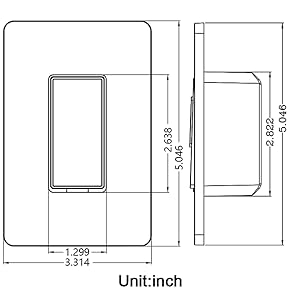
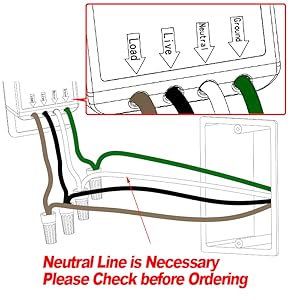


 I bought this switch from Amazon its listed as the wireless garage door opener remote WiFi switch universal.
  The instructions are a bit weak so I’m unsure what that red wire is for, I’m just going to cap it off for now. Even the instructions on the back of the device seem a bit unclear. The paper that came inside the box had the usual small print that required a magnifying glass and just wasn’t clear. It turns out using the red and black wire connected to a 9-30V DC power supply this can be run without the AC connection I tested with.
 A will be for the positive to the garage door opener and Com to the negative. You can use B and Com for a second door and C and Com for a third door or gate. However you only get one open and close indicator for all three. I’m going to use this to replace the wall switch for the garage door and give me the option to use WiFi to open and close the door as well as monitor the status of the door. I also ordered a type 86 wall junction box to put this in and mount it to the wall.


 Online home of Jon